![Regrow_logo-1.png]](https://help.regrow.ag/hs-fs/hubfs/03.%20Logos/Regrow_logo-1.png?height=40&name=Regrow_logo-1.png)
Background
Many inventory clients have questions on how to gauge the impact of their program. You may want a way to understand your impact, especially in year one, which can feel confusing if you don’t have a baseline reference to compare results to.
Clients running inventory projects may want two numbers side by side: what a field or project looked like before practice changes were introduced (the baseline), and what it looks like now (reporting period). Historically, the API had no concept of a baseline, so this comparison had to be handled outside the platform on a case-by-case basis.
Project baseline overview
Now, when an Inventory project is ran through Measure API, you can compare your fields' reporting period emissions to a project baseline that represents pre-project practices.
Regrow calculates this baseline automatically from each field's own historical crop production data — you don't need to run a separate baseline.
For a given project, Regrow returns two baseline values alongside your reporting-period results:
- Field-level baseline: the historical emissions of an individual field, before that field was enrolled in the project.
- Crop-level (project) baseline: the historical emissions performance across all fields in the project, for a given crop.
You can compare either baseline value against the matching reporting-period value to see the directional change associated with your project.
This baseline feature is available for Inventory API projects starting in Measure API v2+.
How baselines are calculated
Setting the baseline period: field_enrollment_date
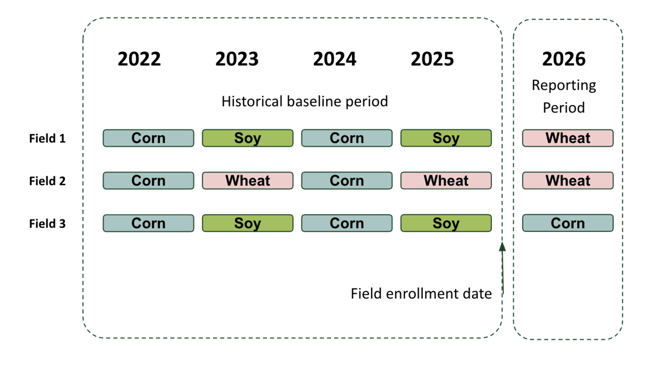
Each field in your project will have a field_enrollment_date. This date marks two things at once: the start of the project period for that field, and the end of that field's baseline period.
- Every cultivation cycle that took place before field_enrollment_date is treated as that field's baseline history.
- field_enrollment_date cannot fall after your reporting period's start date.
- For single-year projects, field_enrollment_date is typically the same date as the reporting period start date.
- Some clients will choose to give all fields the same enrollment date for a single program.
 Field-level baseline calculation
For each field, Regrow identifies the crop grown in the current reporting period, then averages the emissions from every historical cultivation cycle of that same crop found in that field's own baseline history.
Example: If a field's baseline history includes two wheat cultivation cycles and the reporting-period crop for that field is wheat, the field-level baseline is the average emissions of those two wheat cycles.
If a field's baseline history has no cultivation cycle matching the reporting-period crop, that field's baseline is returned as null.Crop-level (project) baseline calculation
The crop-level (project) baseline is a second, separate output — it is not the same calculation repeated at a larger scale. For each crop grown in the reporting period, Regrow takes every field's field-level baseline value for that crop and averages those field-level values together across the project.
Example: If three fields in a project each have their own wheat field-level baseline, the project's wheat crop-level baseline is the average of those three field-level values.
- Only fields that have a (non-null) field-level baseline value for that crop are included in the crop-level average. Fields with no matching crop in their own history — and therefore a null field-level baseline — are excluded from the crop-level average, not treated as zero.
- If no field in the project has a field-level baseline for a given reporting-period crop, that crop's project-level baseline is null.
- Because the reporting crop rotations can shift year to yearr, the set of crops within a project-level baseline can also shift — for example, you might see both wheat and soy project-level baselines one year, and only wheat the next.
Yield impact
Historical yield is not required. For any historical cultivation cycle used in a baseline calculation, Regrow assumes the same yield as that crop's reporting-period yield for that field. For emission factors where yield is the denominator, know that this behavior can influence those numbers.
Example: If your reporting-period corn yield for a field is 100 kg/ha, every historical corn cycle used in that field's baseline calculation is also assumed to be 100 kg/ha.
Uncertainty
Baseline values are delivered post-uncertainty. Baseline values go through the same uncertainty methodology used for reporting-period values — just applied to the baseline time window instead of the reporting period. This is why both sets of values are directly comparable and reportable.
Baseline in multi-year programs
Static field enrollment date
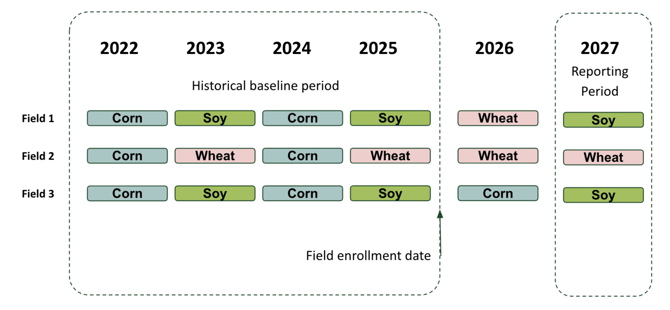
A project's baseline period can remain fixed in subsequent years once it is set in year one; However, the reporting period will continue to roll forward in later years.
Said another way, in multi-year programs, we recommend keeping field_enrollment_date static for a given field year over year, so the baseline comparison point stays consistent as your project reporting period continues to move forward.
Variable enrollment date
You may choose to have an enrollment date that changes year over year. In this case, the outcomes will also change and will cause difficulties in comparison year over year.
Rolling field enrollment into the same program
You may also choose to continually enroll new fields year over year instead of adding them to a new program with a consistent enrollment date for all fields. In this case, you should expect that these new fields will add to the baseline data considered for the program.
Adding fields to a project later
If you choose to continually enroll additional fields into an existing project after baseline values have already been established then, the new field’s history will be factored into the baseline the next time it's calculated. The result will be an update to both the field-level and, in turn, the crop-level baseline values. This may not be desired if you intend to keep your baseline static over time - so keep that in mind.
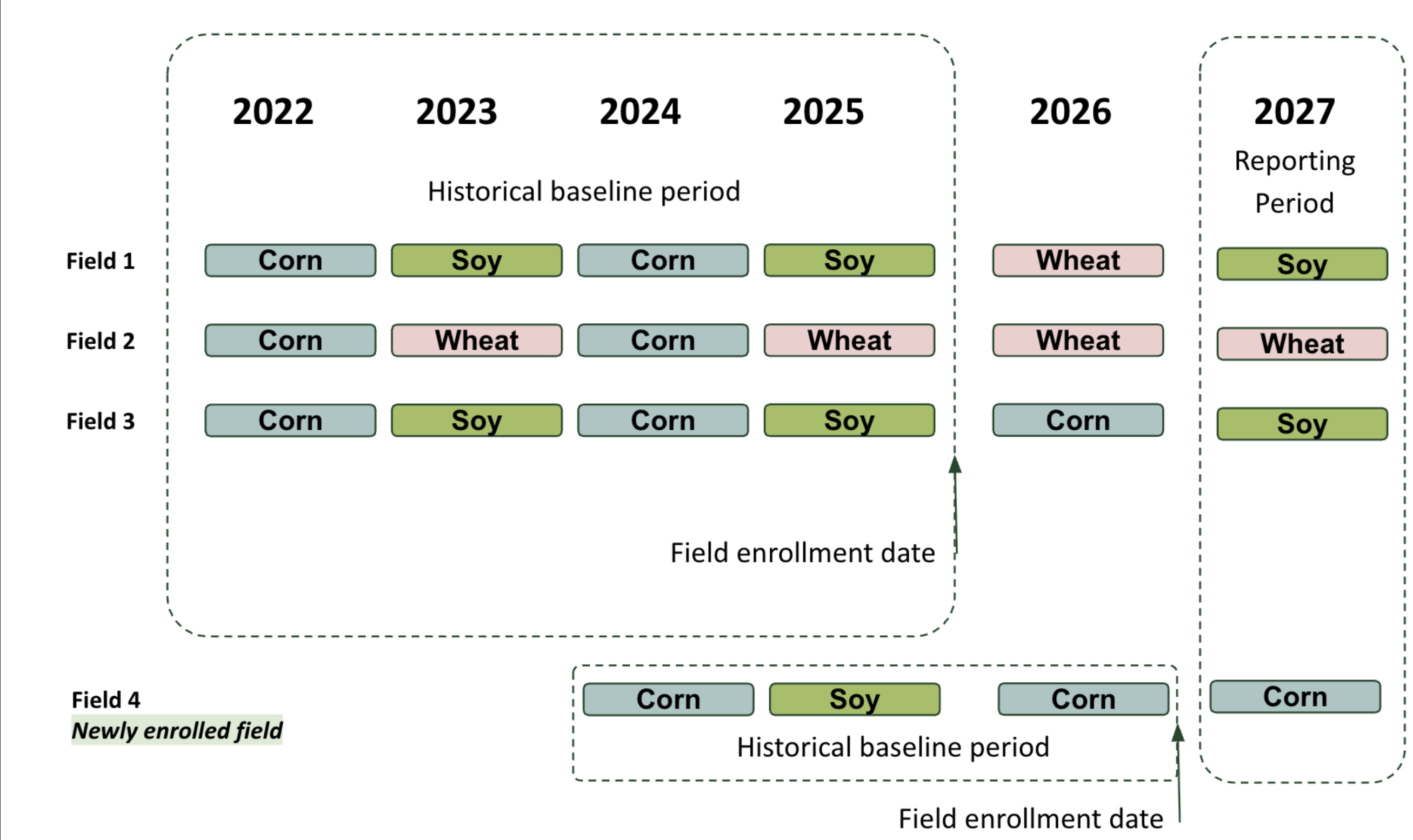
Example, if in 2025 your crop-level has a baseline EF for corn of X, then enroll more fields in 2026, the baseline EF for corn will then be Y.
Other considerations when using a project baseline
Building a standard baseline into the API is more complex than picking a single historical year for every client, for two reasons:
- Crop rotations are inconsistent — a field may not grow the same crop every year, so a fixed "baseline year" often wouldn't have a matching crop to compare against.
- Fields and projects are enrolled and reported on different timelines and sometimes continually, so there isn't one calendar period that works as "the baseline" for every field in a project.
Likewise, Regrow defines each field's baseline using that field's own historical cultivation record rather than a fixed calendar year or an external, third-party benchmark. This maximizes the chance of finding a matching crop to compare against, without requiring extra configuration from you beyond marking when each field's project period begins.
A few other principles shape this approach:
- This method is best suited to clients who want a directional, historical point of comparison — not clients pursuing formal intervention (counterfactual) accounting, which uses a different, more rigorous methodology.
Important limitation: Inventory emissions vary year to year due to factors outside a project's control, such as weather. A change between your baseline and current reporting-period values is not on its own proof that the change came from practice changes. If you need to make a rigorous, causal claim about a practice change, intervention accounting with a counterfactual baseline is the recommended method rather than this historical baseline.
Requirements summary
|
Requirement |
What this means for you |
|---|---|
|
|
Required for every field. Set this to the date on or before the field's project period begins. It cannot be after your reporting period's start date, and we recommend keeping it consistent year over year. |
|
Historical cultivation cycle data |
Submit cultivation cycles for each field prior to its |
|
A matching crop in your baseline history |
A field-level baseline value is only produced where that field's history includes at least one cultivation cycle of the same crop grown in the reporting period; a crop-level baseline is only produced where at least one field in the project has such a value. Expect |
|
Inventory API project type |
This baseline method is available for inventory projects only. |